Tag Archives: SF New Tech
Curate.Us: Share Rich Media, Then Track Them Through Curate.Us Analytics

Curate.Us: Share Rich Media, Then Track Them Through Curate.Us Analytics

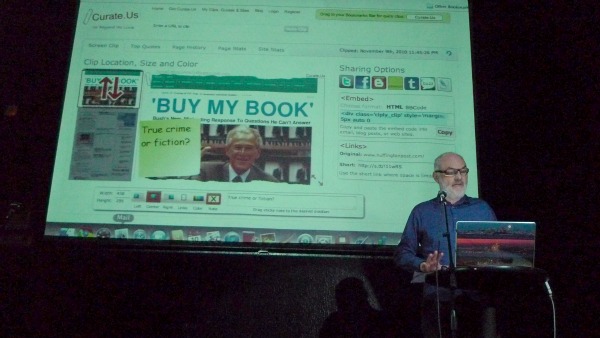
Want an easy way to jazz up your blog or just repost interesting web content? That’s what serial entrepreneur John Pettitt and partner Tim McElreavy desired too, so they went out and created curate.us – a means for copying rich media, repositioning or “clipping” it, adding visually appealing highlights like stickies to draw attention and then re-posting it elsewhere, all the while tracking where it goes along the way.

The kicker is that Curate.Us helps you reposition and customize text or graphics, then tracks the re-post, using their own analytics to see click through, content reuse and where exactly that re-posted graphics is used. Because all clips are fully attributed, according to Pettitt, “it drives traffic back to the sourced graphic or text”, which can be a blog or web site, graphic or rich text or HTML.
curate-us-sfnt-demo-1-pic

Co-Founder John Pettitt presents Curate.Us at 10Nov2010 SFNewTech (Photo Credit: Shiva Manjunath)

On the flip side, though Curate.Us regenerates a page every time you look at it, it will never clip anything copy protected, a confidence booster for any company who values their personal data and content.

For those curious about the technology, Pettitt offered that, “It’s hosted on EC2 runs ubuntu using lighttpd, mysql, php, gearman and uses memcache for caching.”

What’s Next for Curate.Us? Deliver more technology in the future that Pettitt promised will be, “something disruptive that builds on this technology”.

About Curate.Us

Website: Curate.Us
Twitter: @CurateUs
Blog: http://curate.us/curate/blog
Co-Founder: John Pettitt @jpp123
Co-Founder: Tim McElreavy @FreeRangeTim
Dark Overlady of Engineering Kate McKinley @sigkate
Community Czarina Tia Marie @tia_marie
Summarize Webpage Content With WikiSeer Website And FireFox AddOn

Summarize Webpage Content With WikiSeer Website And FireFox AddOn

If you feel overwhelmed by content overload – and who doesn’t these days – Sameer Yami’s WikiSeer might just be the solution you need.
According to co-founder Yami,

WikiSeer siphons through textual content, figures out what’s most important, presents it to you succinctly, and then as a bonus, allows you to share it with friends.

That’s after all the genesis of creating the product, frustration while browsing massive amounts of data

Think of it as Cliff Notes for web content. Yami noted, “you can find book abstracts everywhere, but there was nothing even close for web pages on the net”, thus WikiSeer was born.

wikiseer-demo-sfnt-1-pic

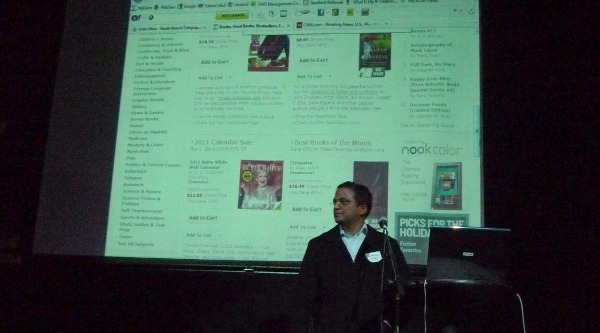
Sameer Yami presenting WikiSeer at 10Nov2010 SFNewTech (Photo Credit: Shiva Manjunath)

Using sophisticated natural language processing (NLP) and several patented techniques, WikiSeer culls the results and sends them back to you, a natural time saver for any reader. WikiSeer is content neutral. It can provide a synopsis of the most relevant sentences of any page, whether you’re seeking the best dishes at a restaurant listed on Yelp, or reading a lengthy book and just want the essence of the content.  It can do so using graphics or text as a foundation for that input.

“We built WikiSeer to find the most informative content in any English text”, explained Yami.

Wanna try it? Take the website  – http://WikiSeer.com/ – for a test ride. You can also summarize any webpage without leaving the site using the Firefox Addon or the Chrome Addon.

Check it out and let them know what you think!

About WikiSeer

Website: http://WikiSeer.com/
Twitter: @Wikiseer
Co-Founder: Sameer Yami
Co-Founder: Sanika Shirwadkar
Contact: Via the Contact Page.
Feedback: Click here to give feedback about your experience.


Weekend What’s Up In San Francisco – BizTechDay 2010, The Woodstock For Entrepreneurs

Weekend What’s Up In San Francisco – BizTechDay 2010, The Woodstock For Entrepreneurs

Join SFNewTech and hundreds of the best entrepreneurs in San Francisco and Silicon Valley at the Metreon this Saturday – October 23rd.

  • LEARN from the best entrepreneurs, media rockstars and investors on Fundraising, PR, Marketing, Social Media, Pricing and Branding strategies and real life stories.
  • GET UP TO SPEED with the latest technology tools that will make a real difference for your business. There are so many new “must use” tools -how do you know where to start, and what’s really worth your time?
  • CONNECT with the founders and partners of Venture Hacks, Kiva, Mashable, Gymboree, Squidoo, Squared, SmallBizTrends, Infusionsoft, Elance, SimplyHired, Flowtown, Startup Digest, Google, Yahoo!, Andreessen Horowitz, 500 Startups, CBS, Women 2.0, Foursquare, Techcrunch, Entrepreneur Magazine and more. Not to mention hundreds of entrepreneurs and small businesses like you.

All in a single day!

biztechday 2010 sf speakers list register now tickets

BizTechDay 2010 - San Francisco. List of Speakers

And since you are so cool, all SFNewTech peeps get 20% off the tickets for BizTechDay San Fraicisco 2010.

Get your discounted tickets now while it last! Use Promo Code SFNewTech at Checkout.

To learn more about this one of it’s kind event, visit BizTechDay San Fraicisco 2010.

Digitally Sign Documents From Anywhere With EasySign iPhone/iPad App

Digitally Sign Documents From Anywhere With EasySign iPhone/iPad App

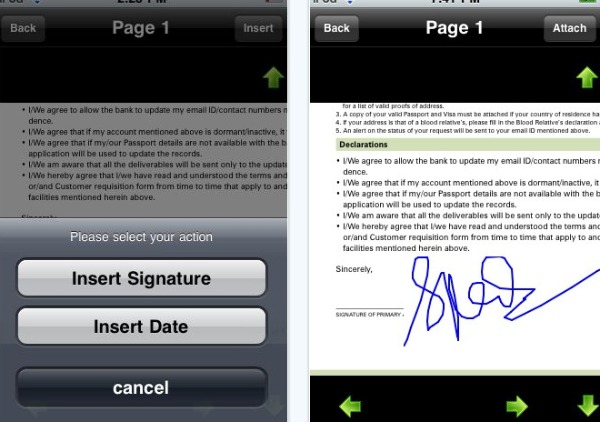
Forget messy paper printouts, scans and faxes. Go green and digitally sign your documents from anywhere in the world using the EasySign iPhone App.

The idea for EasySign was born in a remote beach in Riviera Maya, Mexico when EasySign founder Sunil Patro had to sign some paper documents for a new job offer. Sitting on the Beach, he wondered

How awesome would it be, if I could sign and return this job offer right here, right now, right from my smartphone.

It was at this moment of clarity, that Sunil decided to create this green, paper-free, signature-on-the-go mobile app.

Fast forward a year later, EasySign was launched as an iPhone app at the Apple AppStore in August of 2010. Since then, the EasySign app has received (and continues to receive) great reviews from its users who use it for signing business as well as personal documents.

EasySign digitally sign documents from iphone ipad app pic

Sign Documents from your iPhone/iPad Using the EasySign App

This Wednesday, at our Oct 20th 2010 SFNewTech event, Sunil will show you step by step, how you can sign any document using your iPhone/iPad from anywhere at anytime without the hassles, costs and environmental hazards of printing, scanning and faxing paper documents.

Don’t miss it! Mother Earth will thank you!

Meet AdRoll, For Targeted Ad Campaigns And Retargeted Ads To Recapture Lost Customers

Meet AdRoll, For Targeted Ad Campaigns And Retargeted Ads To Recapture Lost Customers

It is every advertiser’s dream to generate maximum returns on online advertising investments. With it’s easy to use, highly effective and proven display advertising platform, AdRoll promises to deliver that dream and more.

AdRoll will take stage this Wednesday at our Oct 20th 2010 SFNewTech event and show you step by step, how to create a retargeting ad campaign for your product, brand or service using the AdRoll display advertising platform, and how to measure the results.

Unlike a majority of the existing advertising platform where you can’t do anything without requesting contact from a salesperson first, AdRoll includes plenty of self-service options, transparent reporting, and the ability for marketers to manage their own campaigns much in the way they manage their Search Engine Marketing (SEM) campaigns.

Under the hood, AdRoll uses several state-of-the-art technologies including a 100% geo-distributed cloud based infrastructure. If that is a mouthful and the geek in you just has to know, then ask Adam Berke, AdRoll founding member and VP of Business Development to explain it to you in layman terms when you meet him at the event on Wednesday.

Meanwhile here he is, explaining what AdRoll can do for your business in a short simple video.

Freebies?

AdRoll will also be giving out schwag (yay!) to SFNewTech peeps. For the first 3 to 5 questions from the audience, they will give away their ever popular “Roll with me” T-shirts. (Hey, I like how you guys “Roll”!).

I already know what I am going to ask Adam.

What hair gel are you wearing in the what AdRoll can do for your business video?

I am not sure this question will win me a coveted “Roll with Me” (size M please) T-Shirt. We’ll see.

Meet Nimbb The Webcam Video Recorder With API Access

Meet Nimbb The Webcam Video Recorder With API Access

When Benjamin Bérubé was working on a Web project that needed to capture video using a webcam he thought it would be a cakewalk. However, he quickly found out that there was no easy solution to accomplish this.

Instead of complaining on forums and blogs like the average web developer would do, Benjamin did something completely different and innovative. He went out and created Nimbb, a site for recoding and sharing videos from your webcam.

Nimbb is easy, fast* and free**.

nimbb shiva sfnewtech recording in 4 easy clicks :)

My First nimbb Webcam Video Recoding. 30 seconds, 4 clicks, under 1 minute!

Benjamin will be showing off nimbb’s features and capabilities this Wednesday at our Oct 20th 2010 SFNewTech event. Come and check it out.

Benjamin is based in Montreal, Canada. He has recently moved to San Francisco to spread the word about Nimbb, because as he said it himself…

After just one week of marketing in Montreal, I decided to come to San Francisco – where all the action is – to promote Nimbb.

Well, we told Benjamin

You have arrived at the right city and at the right event!

Benjamin loves SFNewTech peeps so much, that he has pledged to give away one full month of Nimbb subscription free to anyone of you that tweets about the service during the demo and follows @nimbb on twitter.

A developer at heart – with over 15 years of experience in application software development – Benjamin will likely answer any questions you may have about the underlying technology that powers the nimbb webcam video recording and sharing service.

So don’t be shy. Come on over!

*fast = I recorded, saved and shared the above 30 second video using my webcam on nimbb in under 1 minute!
** free = Basic membership is free. For a full list of subscription types and price, see the subscription page.

Learn How VideoGenie Can Help You Capture Customer Videos, Drive Conversion And Increase Your Brand Reach

Learn How VideoGenie Can Help You Capture Customer Videos, Drive Conversion And Increase Your Brand Reach

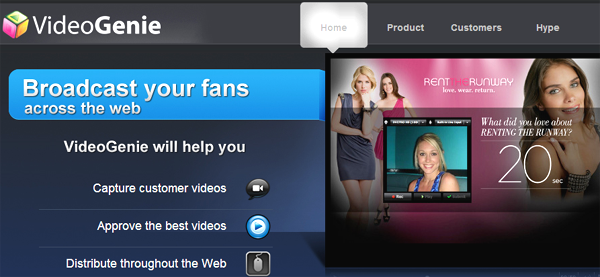
VideoGenie is revolutionizing the way brands connect with their customers. Founder and Stanford Graduate Justin Nassiri will take stage this wednesday (20th October 2010) at SFNewTech so we can say hello to VideoGenie.

See Videogenie in Action this Wednesday! http://oct20sfnewtech.eventbrite.com/

We asked Justin what’s in store for SFNewTech peeps, and he told us that he will show you how VideoGenie

  • captures your customers on video naturally (unscripted),
  • removes the need for complicated editing, and
  • displays these videos in a targeted and socially relevant way and
  • drives customer conversion and increases your brand reach.

Obviously there is lot more to it than this, but we promised Justin not to steal his thunder, so if you want to know more about how VideoGenie can help your brand and also meet Justin himself, head over to our SFNewTech event this Wednesday!

My Gengo Offers Fast, Reliable (And Low Cost!) Language Translation

My Gengo Offers Fast, Reliable (And Low Cost!) Language Translation

My Gengo was founded based on needs its founders saw as a gaping hole in the translation business: too expensive and too slow. So they did what entrepreneurs do: they solved the problem by filling that void.

Mygengo.com founders Robert Laing and Matthew Romaine knew the need was there for a consumer service, “big project management and set up fees just don’t work for every day content translation”.  Plus, Laing added, machine translations were fast but not useful for business applications and to get access to freelancers and agencies, the cost was prohibitive. Gengo means language in Japanese.

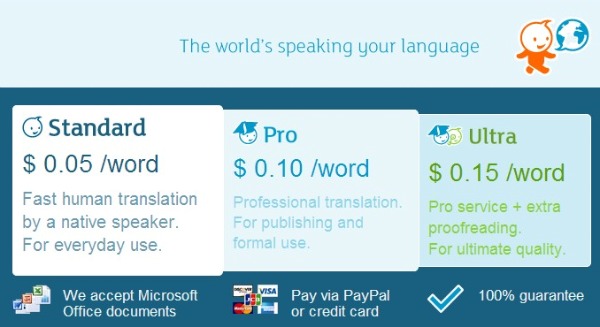
At My Gengo, you have access to a wealth of certified talent who must pass a quality test (of 11,000 applicants, 1200 passed their competency test).  As a result, you get accurate translations for 5 cents a word, about 70% less than standard translation services, translators get flexible hours plus a reliable income.

And My Gengo stands by their work, “We’re so confident, we offer a full refund if customers aren’t happy”.  That’s led to 80% referrals, 40% repeat customers and doubling of volume each quarter.
my gengo cheap fast reliable online translation service japan night demo

It works like this: you post your job at My Gengo, their certified translators will pick jobs they feel most confident completing.  Translation requests range from the simple, like a Tweet, to more complex documents.

Their second product, launched Q1 2010, is an API that can be plugged into a site so that users don’t need to go to My Gengo to get access to their services. Currently API partners are Magento (ecommerce site) and Movable (the most used publishing system in Japan, often used for blogs).

Having received seed funding, My Gengo is now moving to their next stage of funding.

Drrop Is A Social Network With Privacy Filters And Control

Drrop Is A Social Network With Privacy Filters And Control

“Think of it as a way to say hi,” that’s how Founder, Project Lead & Programmer Takuro Yoshida describes his newly launched social communications site called Drrop.  Takuro Yoshida co-founded Drrop with Hiro Kobayashi in September 2010 (barely a month ago!)

Focusing on the need to basically filter or screen people trying to friend you on the likes of Facebook, Twitter and LinkedIn, Yoshida believes Drrop is a way to offer more control and privacy to social media users.

Drrop - A Unique Social Network with Filters

Why does he consider Drrop more private?

“You can’t see the user’s profile unless you reply to the person’s first Drrop note to you, and if you decide to not reply, you just use a feature called “wipe” to rid your screen of the person’s comments and they are gone forever.

The biggest differentiator? According to Yoshida it’s that you see each person’s comments, one by one, and 24 hours after it’s posted, it’s not visible any more!

Enterprise Development Goes Mobile With Coopa

Enterprise Development Goes Mobile With Coopa

Coopa, a product with a name derived from cooperation, launched the same day it presented at SF New Tech.

At the first ever Japan Night event (brought to you by SFNewTech and btrax), Coopa was presented by Tsutomu Sasaki, President & Yashuhiro Yamada (Cloud Solutions).

Coopa is a enterprise level, business application development tool for building cloud-based applications, running on mobile devices.

The company provides an application engine for enterprises developing using HTML5 or JavaScript. With Coopa, companies create customized applications using a framework library of native/hybrid type applications.

Coopa / yubizo - Enterprise iPhone / iPad App Development Engine

Showing its versatility, Coopa supports creating business applications on iphones for enterprise level applications and for Google’s Android environment.

Their applications integrate smoothly within a Google environment, as they run on top of Google apps. Sasaki noted they believe they are one of few companies developing enterprise level applications for the Google apps platform. To ensure consistency, they are a Google certified partner.